New — Now live in the Chrome Web Store

    Personal Injury, Immigration & Multi-Practice Firms

    AI-Powered Legal Operations for the Modern Law Firm.

    FirmLink connects lead intake, team communication, client communication, documents, e-signatures, payments, and case preparation in one platform.

    Built first for personal injury, with dedicated immigration workflows and practice-aware support for growing multi-practice firms.

    English & SpanishBuilt for your whole teamAttorney-controlled automation
    Powered by AWS Cloud Computing

    Enterprise-grade cloud infrastructure for secure legal operations.

    Connected communication

    Keep Your Entire Firm Connected

    Internal teamwork and client-facing communication stay in one connected system without mixing private firm discussions with secure client messages.

    Team Comms

    Give your team a private workspace for firm-wide conversations, direct messages, matter-specific discussions, files, mentions, and unread work.

    Tag Wynn to summarize a thread, inspect the connected matter, surface blockers, or route an attachment into the right workspace.

    Client Communications

    Keep secure client messages in a branded portal instead of scattered texts, personal phone numbers, and disconnected email threads.

    Unread conversations, notifications, and the related lead or case stay connected so the next response is easy to find.

    Calls, Texts & Meetings

    Bring call activity, missed-call intake, inbound SMS, callback requests, consultations, and virtual meetings into one Communications Hub.

    Every conversation has somewhere to go, and your team can see what needs attention next.

    Lead to resolution

    One Connected Legal Workflow

    Every lead, conversation, document, payment, and next step shares one operating context.

    Watch the demos

    FirmLink Legal

    One operating context

    1. CaptureCalls and website leads
    2. EngageTriage, schedule, and sign
    3. CommunicateTeam, clients, and meetings
    4. CollectDocuments and portal tasks
    5. PrepareRecords and case work
    6. Get PaidConfido payment requests

    Wynn keeps work visible, auditable, and attorney-controlled.

    Practice fit

    PI-first depth. Immigration-ready. Multi-practice by design.

    Each matter gets the right intake, documents, communication, and follow-up without PI language leaking into unrelated practice areas.

    Personal injuryImmigrationDWI defenseBusiness law

    Deepest workflow

    Built First for Personal Injury

    Manage accident intake, treatment, insurance, medical records, bills, evidence, wage loss, chronology, depositions, demands, negotiations, liens, offers, and settlement preparation.

    Dedicated workflow

    Immigration

    Support bilingual intake, USCIS and EOIR matters, document collection, receipts, notices, RFEs, NOIDs, court dates, evidence, research, and ongoing client communication.

    Practice-aware support

    Multi-Practice Firms

    Use practice-aware intake, documents, tasks, calendars, communications, e-signatures, and client portals for DWI defense, business law, and mixed-practice matters.

    Legal payments in case context

    Secure Legal Payments, Powered by Confido Legal

    Authorized users can create and track legal payment requests without separating payment activity from the client, matter, and portal workflow.

    Integrated withConfido Legal

    Create payment requests for a client and matter

    Select an operating or trust account

    Support client or third-party payers

    Create secure Confido-hosted checkout links

    Place confirmed requests in the client portal

    Review payment links and transaction status

    Checkout stays on Confido-hosted pages. FirmLink never handles raw card or bank-account information.

    Now live in the Chrome Web Store

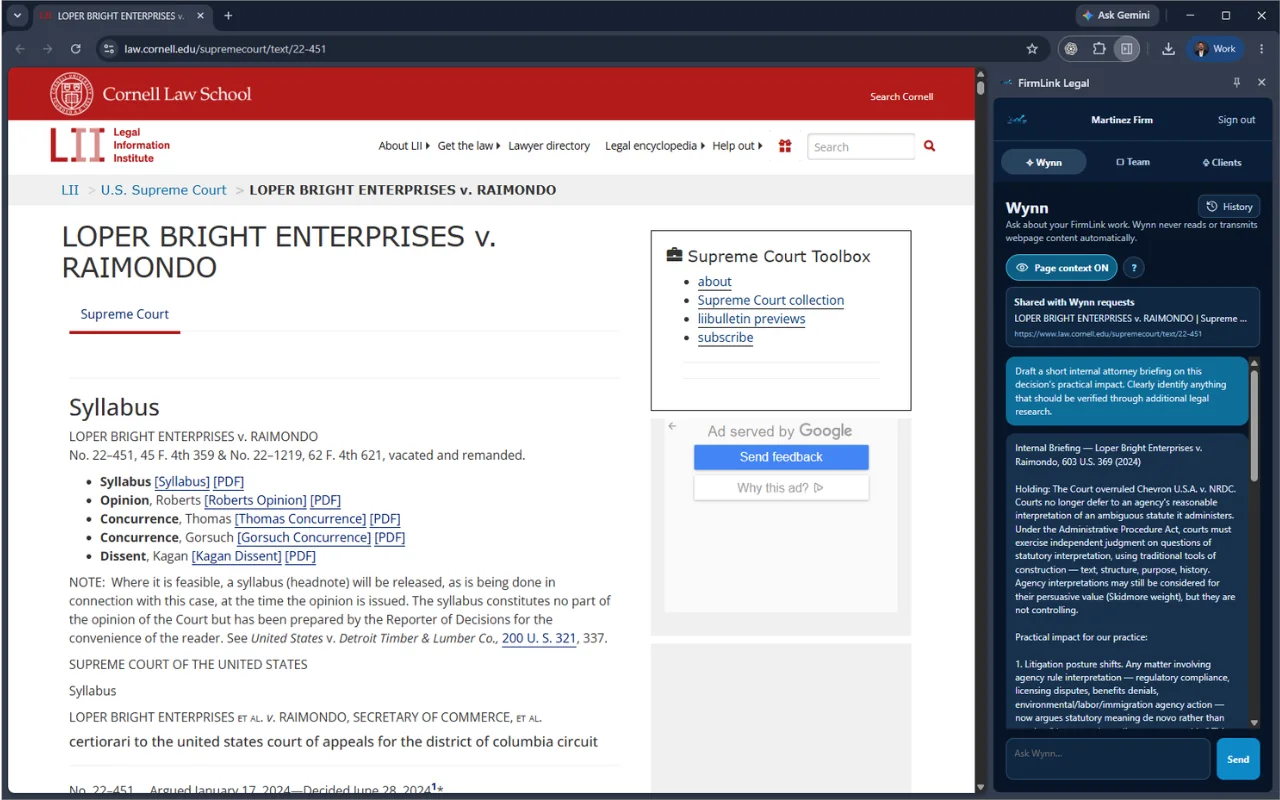
    Bring Wynn Beside the Legal Work Already Open in Chrome.

    Ask Wynn questions, access conversation history, check Team discussions, and stay connected to authorized client conversations without repeatedly switching back to FirmLink.

    Answer and summarize calls
    Organize new leads and next steps
    Read internal matter discussions
    Review uploaded documents
    Available in the Chrome Web Store

    Included with FirmLink Legal membership. A FirmLink account is required.

    Page Context is optional. When enabled, Wynn receives the active tab's title and web address—not page text, passwords, files, browsing history, or other tabs.

    FirmLink Legal Chrome side panel beside a Cornell Legal Information Institute page, with Wynn preparing an internal attorney briefing
    Research on the left. Wynn on the right. Ask questions, receive an internal briefing, and stay inside the work already open in Chrome.
    FirmLink Legal People's Choice Award at the Geeks&& AI April Showcase

    Winner — People's Choice Award

    Geeks&& AI April Showcase

    San Antonio, Texas

    What is FirmLink Legal?

    FirmLink Legal is an AI-powered legal operations platform that connects lead intake, team communication, client communication, documents, e-signatures, payments, and case preparation in one workspace.

    Which practice areas does FirmLink support?

    FirmLink is built deepest for personal injury, includes dedicated immigration workflows, and provides practice-aware support for DWI defense, business law, and growing multi-practice firms.

    How do payments work in FirmLink?

    Authorized users can create case-linked payment requests, choose an operating or trust account, support client or third-party payers, and track status in FirmLink. Checkout happens on secure pages hosted by Confido Legal, so FirmLink never handles raw card or bank information.

    Does Wynn replace attorney judgment?

    No. Wynn can gather facts, summarize, draft, review documents, route work, and recommend next steps, but attorneys and staff remain responsible for matter acceptance, sensitive client communication, filing, and legal judgment.

    Can I use FirmLink while I work in Chrome?

    Yes. FirmLink Legal is available in the Chrome Web Store for FirmLink members. Open Wynn, Team, and authorized client conversations in Chrome's side panel, then pin the FirmLink icon beside the address bar for easy access.

    Give your team a cleaner way to move legal work.

    Connect intake, communication, documents, payments, and case preparation while your attorneys stay in control.

    No credit card required. Guided setup included.